Autodoc
Create documentations of python project automatically by using annotations in the code.
Autodoc Settings
Activate autodoc extension
- Open
conf.py - Find
extensionsand add autodoc extension:extensions = ['sphinx.ext.autodoc']
- Open
Note
For Sphinx(actually, the Python interpreter that executes Sphinx) to find your module, it must be importable. That means that the module or the package must be in one of the Python path.
Warning
autodoc imports the modules to be documented. If any modules have side effects on import, these will be executed by autodoc.
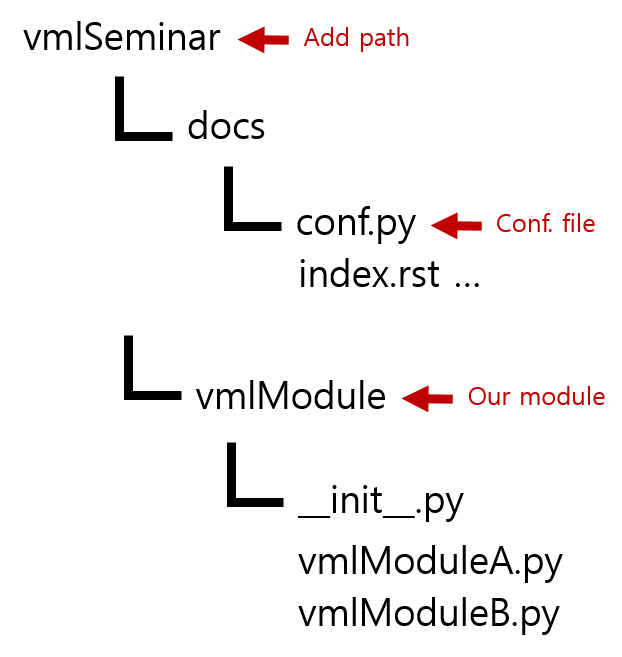
Add your module path to Python path
- Open
conf.py - Find
sys.path.insertand add your module path - ex) sys.path.insert(0, os.path.abspath(‘..’))
- Open
Autodoc docstrings
In your python code, put the annotations using specific format
Two different docstring style (Sphinx syntax / Google style guide)
- see VML_Module_A
- ex) vmlModuleA.py
def vmlModule_fuctionA(argA, argB) :
    """
    This function is vmlModule function A. Result is summation of input two arguments.

    :param argA: This is argument A.
    :param argB: This is argument B
    :return: argA+argB. Kids stuff.
    """
    return argA + argB

def vmlModule_fuctionB(argA, argB) :
    """
    This function is vmlModule function B. Result is multiplication of input two arguments.

    Args:
        argA: This is argument A.

        argB: This is argument B.

    Returns:
        argA*argB. Much more difficult than function A!
    """
    return argA*argB
Autodoc modules
Using
.. automodule::in your .rst file- ex)
vmlModuleA.rstfile
- ex)
VML_Module_A
-----------------------------------------------------

.. automodule:: vmlModule.vmlModuleA
    :members:
- There there are various autodoc modules for the purpose.
- ex)
.. autoclass::,.. autofunction::, ...